Prepare a list of members and check the data that are transferred to the Sport Register (SR).
Filter the members you will want to export from EOS to the SR and carry out the data export.
Check the exported data and fill in or adjust selected items.
Open the SR and carry out the data import.

Below you will find detailed steps and tips on how to carry out the export from EOS, as well as how to do the import into the SR.
Prepare a list of the members you will want to import into the SR. That does not have to be all the members from your database. We recommend tagging all members – that is, both athletes and coaches – whom you keep records of in the SR. In Management > Members you can assign tags in bulk and then filter by them for the export.
Check the data of all members that are transferred to the SR in order to prevent errors during the import and validation in the SR. Check especially the items that are marked as mandatory in the list of fields below.

Select the members you want to export. If you are not going to export all of them, you can make the selection using filters on the tag you set.
Click the export button in the Members module and choose the Export type NSA Register and the Export format CSV.
Open the exported file (e.g. in Excel or Numbers).

Check that all citizens of the Czech Republic have a National ID number stated and that all foreigners have a Date of birth and Residence. Correct any errors in EOS and carry out the export again.
Check that athletes and coaches are correctly marked with the flag, including the “From” date.
Check the type of sport, the frequency of sporting activity and the inclusion in competitions. Fill in what is missing in the table.
If a member is both an athlete and a coach, their record needs to be duplicated (copy the row) and the fields (cells) on each row need to be adjusted so that they belong only to that one role.
If you have made any changes, save them.
After carrying out the import, check which records (members) the SR accepted and which it rejected as faulty. The list of faulty records can be exported from the SR and subjected to a check.
You can then correct the import file, adjust its name so that it is unique for the SR and carry out the import again.
If some member cannot be imported, try entering them into the SR manually.
Overview of columns for the import – mandatory data
JMENO – first name *1)
PRIJMENI – last name *1)
RODNE_CISLO – number format without a slash, not mandatory for foreigners
OBCANSTVI – the citizenship code, it must correspond to the SR code list
DATUM_NAROZENI - format DD.MM.YYYY, mandatory for foreigners
POHLAVI – Ž = female, M = male – mandatory only for newly registered people, otherwise it must be identical with the existing record
NAZEV_OBCE – mandatory for foreigners *2)
CISLO_POPISNE – mandatory for foreigners *2)
PSC – mandatory for foreigners *2)
SPORTOVEC – is the natural person an athlete? 1 = YES, 0 = NO *3) (EOS sets 1 if the field "Member from" is filled in)
SPORTOVCEM_OD – the date from which the person is registered as an athlete, mandatory for athletes *3) (EOS sets the date filled in the field “Member from”)
SPORTOVEC_DRUH_SPORTU – the number of the type of sport according to the NSA code list; if it cannot be classified, then code 999, mandatory for athletes *4) (not transferred from EOS – it must be filled in manually in the CSV)
SPORTOVEC_CINNOST_OD – the date from which the person started their activity in the relevant sports discipline, mandatory for athletes *3) (EOS sets the date filled in the field “Member from”)
SPORTOVEC_UCAST_SOUTEZE_POCET – number = The number of competition days (0 = does not take part in competitions) Important for correct classification into the NSA subsidy category *5) (it must be filled in manually in the CSV, or you can use the option of exporting Events and then joining the data)
TRENER – is the natural person a coach? 1 = YES, 0 = NO *3) (EOS sets 1 if the field "Team manager from" is filled in)
TRENEREM_OD – the date from which the natural person is registered as a coach, mandatory for coaches *3) (EOS sets the date filled in the field "Team manager from")
TRENER_DRUH_SPORTU – the number of the type of sport according to the NSA code list; if it cannot be classified, then code 999, mandatory for athletes *4) (not transferred from EOS – it must be filled in manually in the CSV)
TRENER_CINNOST_OD – the date from which the person started their activity in the relevant sports discipline, mandatory for coaches *3) (EOS sets the date filled in the field "Team manager from")
Overview of columns for the import – optional data
TITUL_PRED
TITUL_ZA
NAZEV_CASTI_OBCE *2)
NAZEV_ULICE *2)
CISLO_ORIENTACNI *2)
SPORTOVCEM_DO – If the membership continues, this field is not filled in (otherwise EOS sets the date filled in the field “Member until”)
SPORTOVEC_CETNOST – The number of sporting sessions per week (whole number), Important for correct classification into the NSA subsidy category *5) (not transferred from EOS – it must be filled in manually in the CSV; it is a prediction for the following period )
SPORTOVEC_CINNOST_DO – If the membership continues, this field is not filled in (otherwise EOS sets the date filled in the field “Member until”)
TRENEREM_DO – If the membership continues, this field is not filled in (otherwise EOS sets the date filled in the field “Team manager until”)
TRENER_CETNOST - The number of coaching sessions per week (whole number) (not transferred from EOS – it must be filled in manually in the CSV, but it is not mandatory)
TRENER_CINNOST_DO – If the membership continues, this field is not filled in (otherwise EOS sets the date filled in the field “Team manager until”)
EXT_ID – The sports organization’s own identifier
SVAZ_ICO_SKTJ – Filled in only by sports federations
Notes:
1) The First name and Last name are checked against the population register in the SR. You must have the name written in EOS exactly as it is in the registry, i.e. on the identity card or birth certificate. Watch out for multiple first names (sometimes they may not be recorded) or the names of foreigners, where it must correspond to the visa record or the item "registry record" on the residence permit card.
2) The address must correspond to the permanent residence address and is checked against the address register. EOS also carries out this check against the register. If the address entered in EOS corresponds to the register, it is marked "Verified address".
3) The fields "Member from" and "Team manager from" in the member detail – only one of them must be filled in, i.e. Member from for athletes or "Team manager from" for coaches, or both if the person is both an athlete and a coach.
4) You can download the NSA "Code list of types of sports" on the website: https://rejstriksportu.cz/dashboard/public/dokumentace – in the section "Form for filling in athletes and coaches".
If a member has more than one type of sport (new since 2024), the import table needs to contain as many rows for the given athlete as they have sports, and only the type of sport, the frequency of training sessions and the number of competitions will differ.
5) The settings "Athlete in competitions" and "Frequency of training sessions" must always be filled in in accordance with the conditions of the current NSA subsidy call. The applicant for the subsidy is always responsible for correctness.
6) If the dates “Start / end of membership (records)” differ from the dates “Start / end of activity” for your athlete / coach, then you have to adjust it in the export manually.
If you open the file e.g. in Excel, do not let it carry out any data conversions.
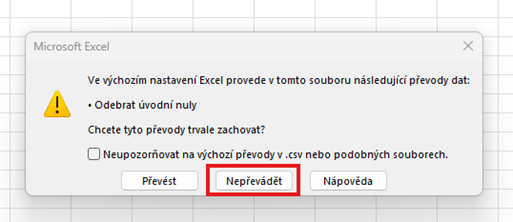
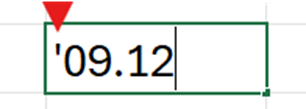
If the code of your sports discipline is interchangeable with a date notation, then Excel will automatically convert it to a date format. For example the code 9.12 will be converted to 09.XII – all such codes need to be entered manually with a leading apostrophe, which keeps the notation in text format.
Do not change the structure of the document in any way, i.e. the cell format, the header or the order of the columns. Changing the column width is not a problem.
The text encoding is UTF-8. When saving the file choose CSV in the UTF-8 variant if the program offers it to you.
